Dependency Injection
There is an excellent book on Dependency Injection that I genuinely recommend: Dependency Injection: Principles, Practices, and Patterns by Mark Seemann and Steven van Deursen.
But if you’re anything like me, you’d rather skip the endless real-world analogies about chefs making Bolognese sauce and get straight to the code.
That’s exactly what this article does. It distills what I believe every Unity developer needs to know about Dependency Injection into a practical, no-fluff guide. If your goal is writing clean, scalable Unity architecture, you can start here—and you probably won’t need anything else.
Chapter 1: Dependency Injection as an Architectural Boundary
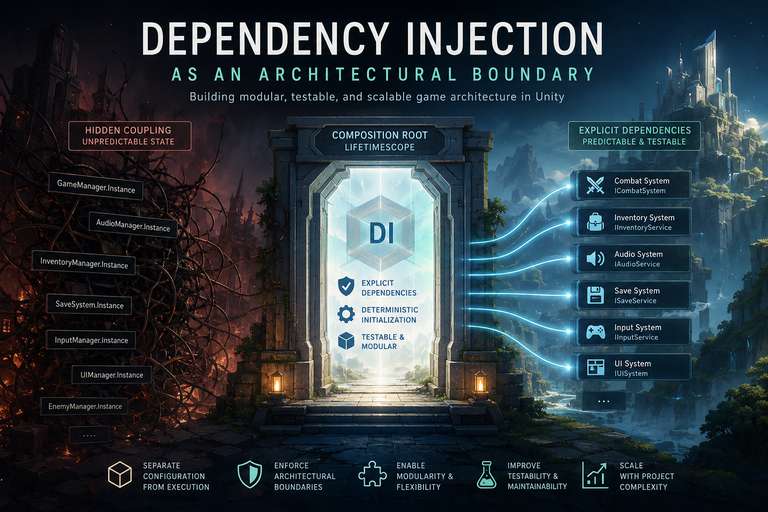
When discussing Dependency Injection (DI) in modern Unity development, the conversation often gets stuck on the mechanics of syntax—specifically, passing an interface through a constructor to avoid using the new keyword. While true, this perspective is too narrow for large-scale game architecture. DI is not just a technique for managing instantiation; it is one of the primary mechanisms for enforcing strict architectural boundaries.
The True Cost of Hidden Coupling
In complex C# game projects, the real enemies are hidden coupling and unpredictable state initialization. Without a formal DI approach, developers often rely on static accessors (Singletons), Service Locators, or deeply nested serialized prefab references to connect disparate systems.
While these approaches work for smaller scopes, they create an opaque, brittle web of dependencies. When a class reaches out globally to grab a GameManager.Instance, it hides its requirements. This makes headless testing nearly impossible and turns refactoring into a cascading nightmare. Furthermore, relying on Unity’s native Awake and Start lifecycle for system initialization often leads to race conditions—forcing developers into brittle workarounds like tweaking script execution orders.
Deterministic Configuration
Dependency Injection solves this by formalizing the separation of configuration from execution. By adopting a lightweight DI container (like VContainer), you extract the responsibility of assembling your game’s components out of individual classes and centralize it into a deterministic, code-driven root. A class no longer reaches out to find what it needs; it explicitly declares its dependencies in its constructor. The container analyzes these requirements and handles the topological sort, guaranteeing that every service is fully instantiated and injected in the exact right order before the game logic ever executes.
The Boundary of the Domain
Most importantly, DI makes a pure, decoupled domain model viable in Unity. In a robust architecture, you want to maintain a strict separation between your core game logic (state, rules, simulation) and the engine’s presentation layer (rendering, UI, input).
When your systems communicate purely through injected interfaces, your core logic remains completely agnostic to the engine itself. The presentation layer essentially becomes a “plugin” to your domain. By viewing DI as a boundary enforcer rather than a mere object creator, you stop writing monolithic manager classes and start writing modular, highly testable systems that scale seamlessly as your project’s complexity grows.
Chapter 2: The Anatomy of Modern Injection
While there are several ways to inject dependencies, not all forms of injection provide the same architectural guarantees. For core systems in a C# codebase, Constructor Injection is generally considered the preferred approach for required dependencies. You are not using Constructor Injection just because it looks cleaner; you are using it to enforce immutability and state safety.
Eradicating Temporal Coupling
Unity’s inherent design often pushes developers toward temporal coupling. Because Unity controls the instantiation of MonoBehaviour objects, developers frequently rely on empty constructors followed by an Initialize(...) or Setup(...) method called later in the lifecycle.
This creates a dangerous window of invalid state: the object exists in memory, but it cannot be safely used until its initialization method is explicitly called. If another system attempts to access it too early, you get null reference exceptions or undefined behavior.
Constructor injection eliminates this window entirely. By requiring all dependencies upfront, the object dictates its survival requirements. If the DI container yields an instance of your class, it is guaranteed to be 100% valid, fully wired, and ready to enter the game loop immediately.
Immutability and readonly Guarantees
Even in predominantly single-threaded Unity applications, immutable dependencies make systems easier to reason about and significantly reduce accidental state mutation. Constructor Injection naturally encourages this design because injected dependencies can be assigned to readonly fields.
Immutability provides several important benefits:
- Dependencies cannot be replaced after construction.
- Object invariants remain valid throughout the object’s lifetime.
- Code becomes easier to reason about during maintenance and refactoring.
- If parts of your project later become multithreaded (Jobs, async systems, networking, etc.), immutable references provide additional thread-safety benefits.
public interface ICombatResolutionSystem
{
    void ResolveDamage(IWeapon weapon, IDamageable target);
}

public class CombatResolutionSystem : ICombatResolutionSystem
{
    private readonly IEventBroker _eventBroker;

    // CONSTRUCTOR INJECTION: The persistent service dependency is injected once upon creation.
    // It is guaranteed to be valid and immutable for the life of this object.
    public CombatResolutionSystem(IEventBroker eventBroker)
    {
        _eventBroker = eventBroker;
    }

    // METHOD INJECTION: Transient, per-operation data is passed exactly when needed.
    // The system calculates damage using the live objects involved in the current frame.
    public void ResolveDamage(IWeapon weapon, IDamageable target)
    {
        int damage = weapon.BaseDamage * weapon.StatMultiplier;
        target.ApplyDamage(damage);
        _eventBroker.Publish(new DamageDealtEvent(damage));
    }
}
This ensures that the structural foundation of the class cannot be modified after creation. No other system can accidentally swap out the _eventBroker mid-frame, and the reference cannot be nullified. The class can confidently operate on these dependencies for its entire lifetime without constant null-checks.
Property and Method Injection
If Constructor Injection is the standard, where do Property and Method injection fit in?
Property (Setter) Injection should generally be avoided for required dependencies because it reintroduces mutable state. It remains useful for genuinely optional services where sensible fallback behavior exists. In Unity, Method Injection or field injection (using [Inject]) is commonly used for MonoBehaviour components because Unity—not the DI container—controls their construction. Since constructor injection is unavailable for MonoBehaviours, these approaches provide a clean way for the container to supply dependencies after Unity creates the component.
Method Injection serves a completely different, highly practical purpose. It should not be used to pass global services. Instead, Method Injection is ideal for passing transient, per-operation data—things that change frame-by-frame or action-by-action.
In your actual game code (like a collision handler on a character), the invocation looks like this. The Unity component receives the pure interface via DI, but passes the localized, transient data into the method:
public class HitboxCollider : MonoBehaviour
{
    private ICombatResolutionSystem _combatSystem;
    private IWeapon _equippedWeapon;

    // The DI container injects the stateless system interface into the MonoBehaviour
    [Inject]
    public void Construct(ICombatResolutionSystem combatSystem)
    {
        _combatSystem = combatSystem;
    }

    private void OnTriggerEnter(Collider other)
    {
        if (other.TryGetComponent(out IDamageable target))
        {
            // Method Injection: Transient data is passed exactly when needed.
            // The system calculates damage using the live objects involved in the collision.
            _combatSystem.ResolveDamage(_equippedWeapon, target);
        }
    }
}
Wiring It Together: The Composition Root
To make the above code function, the DI container needs to know how to construct CombatResolutionSystem and what to pass into its constructor. In VContainer, this configuration happens in a LifetimeScope.
This is your Composition Root—the single place where you map interfaces to implementations and define lifecycles, completely decoupled from the classes themselves:
using VContainer;
using VContainer.Unity;

public class GameLifetimeScope : LifetimeScope
{
    protected override void Configure(IContainerBuilder builder)
    {
        // 1. Register the underlying service
        builder.Register<IEventBroker, EventBroker>(Lifetime.Singleton);

        // 2. Register the system interface mapped to its concrete implementation.
        // VContainer will automatically see it needs an IEventBroker and inject it.
        builder.Register<ICombatResolutionSystem, CombatResolutionSystem>(Lifetime.Singleton);

        // 3. Register the MonoBehaviour so VContainer can run its [Inject] method
        builder.RegisterComponentInHierarchy<HitboxCollider>();
    }
}
Chapter 3: Object Lifecycles and State Management
Defining how an object is created is only half of the dependency equation. In a performance-critical environment like a Unity game loop, defining how long an object lives is equally important. Memory leaks, cross-scene state contamination, and Garbage Collection (GC) spikes are frequent symptoms of poorly managed object lifecycles.
When you register a dependency in a DI container like VContainer, you must explicitly define its lifespan. These lifecycles generally fall into three categories: Singleton, Transient, and Scoped.
1. Singleton (Container-Bound State)
In traditional Unity development, a Singleton is usually a class with a public static instance. This is a global variable, and it carries all the risks of global state: it is difficult to mock, impossible to swap out, and persists forever (often relying on DontDestroyOnLoad).
A DI Singleton is architecturally different. It is only a single instance within the context of the container. The class itself has no static fields. Singletons are ideal for core, stateless logic or centralized reactive state.
public class PlayerProfile
{
    // Reactive state held safely within a container-bound singleton.
    // There is no public static PlayerProfile.Instance here.
    public ReactiveProperty<int> Gold { get; } = new(0);
}
When injected, every system gets the exact same instance of PlayerProfile, allowing them to bind to the Gold stream. However, because it is injected, you can easily swap it out for a MockPlayerProfile during testing, leaving no static residue behind.
2. Transient (Instanced on Demand)
When a dependency is registered as Transient, the container creates a brand-new instance every time it is injected into a class.
For C# game developers, Transient lifecycles come with a strict warning label: Beware of GC allocation. Because Transient creates a new object allocation on the heap, you should avoid using it for gameplay objects that spawn frequently (like projectiles or visual effects). For those high-frequency entities, use standard Object Pooling. Transient is best reserved for lightweight, stateless utility classes, or one-off command objects that are instantiated exactly once during a system’s initial setup.
3. Scoped (Contextual Lifecycles)
This is where Dependency Injection provides its most powerful architectural advantage in Unity. A Scoped dependency acts exactly like a Singleton, but its lifespan is tied strictly to a specific context—most commonly, a Unity Scene.
In VContainer, a “Scope” is represented by a LifetimeScope component attached to a GameObject. These scopes are designed to be hierarchical. In a robust architecture, you will have a root scope that lives in an initialization scene and holds the global, persistent state of your game. When you load a new scene (for example, a combat level), that scene contains its own LifetimeScope.
This creates a strict, one-way dependency flow:
-
The Child can see the Parent: Systems inside the match can ask for Singletons from the core game (like saving data to the player profile).
-
The Parent cannot see the Child: The core game remains completely ignorant of the match, keeping your core architecture decoupled from specific game modes.
Here is how you express this parent-child relationship:
// 1. THE PARENT (Root Scope)
public class CoreGameScope : LifetimeScope
{
    protected override void Configure(IContainerBuilder builder)
    {
        // SINGLETON: One instance for the entire life of the application.
        builder.Register<PlayerProfile>(Lifetime.Singleton);
        builder.Register<IEventBroker, EventBroker>(Lifetime.Singleton);
    }
}

// 2. THE CHILD (Scene Scope)
public class MatchSceneScope : LifetimeScope
{
    protected override void Configure(IContainerBuilder builder)
    {
        // SCOPED: Created when the scene loads, destroyed when it unloads.
        // It leaves zero static state behind to contaminate the next match.
        builder.Register<MatchStateTimer>(Lifetime.Scoped);
        builder.Register<MatchResolutionSystem>(Lifetime.Scoped);
    }
}
Avoid Lifetime Mismatches
One of the most common DI mistakes is allowing long-lived services to depend on shorter-lived ones.
If a Singleton captures a Scoped dependency, it may continue referencing an object after its scope has been disposed. This can lead to stale references, disposed-object exceptions, and scene-state leaks.
As a general rule, dependencies should point toward equal or longer-lived services. Scoped services can safely depend on Singletons, but Singletons should not retain Scoped services.
Entry, Exit, and IDisposable Cleanup
Objects enter and exit a scope based on the Unity lifecycle of the LifetimeScope GameObject. When the combat scene unloads, VContainer instantly disposes of the container.
Crucially, if your scoped dependency implements IDisposable, VContainer automatically calls Dispose() on it before garbage collection. This allows your purely C# systems to cleanly unsubscribe from reactive streams and prevent memory leaks without needing a MonoBehaviour.OnDestroy() callback:
public class MatchStateTimer : IDisposable
{
    private readonly IDisposable _tickerSubscription;

    public MatchStateTimer()
    {
        // Subscribe to a generic tick stream
        _tickerSubscription = Observable.Timer(TimeSpan.Zero, TimeSpan.FromSeconds(1))
            .Subscribe(_ => UpdateTime());
    }

    private void UpdateTime() { /* Logic */ }

    // VContainer automatically calls this when the scene/scope unloads,
    // cleanly killing the stream before the timer is garbage collected.
    public void Dispose()
    {
        _tickerSubscription?.Dispose();
    }
}
Chapter 4: Structuring the Composition Root and Dynamic Instantiation
As your architecture matures, the LifetimeScope (your Composition Root) becomes the central nervous system of your game. However, if left unchecked in a massive codebase, this root can easily degrade into a bloated “God Class” containing thousands of lines of configuration. Furthermore, as you begin to spawn objects dynamically at runtime, you face a new architectural threat: the temptation to leak the DI container into your core game logic.
The Composition Root Owns Infrastructure
The Composition Root should be the only part of the application that understands the dependency injection framework. It forms the architectural boundary between your domain and your infrastructure.
Only the Composition Root should know about:
- concrete implementations
- VContainer-specific APIs
- registrations
- lifetimes and scopes
Everything else should depend only on abstractions. Gameplay systems should request interfaces, not concrete implementations, and should never reference IObjectResolver, LifetimeScope, or other container-specific types directly.
Modularizing the Root with Installers
A core principle of clean architecture is that systems should be partitioned. Your audio system, networking layer, and combat logic should not be tangled together in a single massive configuration method.
To solve this, modern DI frameworks utilize Installers (or Modules). An installer is simply a class dedicated to registering a specific cohesive group of dependencies. Instead of writing every registration in the main scope, the root scope simply delegates the work to these installers.
// A modular installer strictly for the Audio Subsystem
public class AudioSystemInstaller : IInstaller
{
    public void Install(IContainerBuilder builder)
    {
        builder.Register<IAudioMixer, FmodAudioMixer>(Lifetime.Singleton);
        builder.Register<SFXPlayer>(Lifetime.Singleton);
    }
}

// The core game scope remains clean, acting only as a high-level manifest
public class CoreGameScope : LifetimeScope
{
    protected override void Configure(IContainerBuilder builder)
    {
        builder.Register<PlayerProfile>(Lifetime.Singleton);

        // Delegate complex subsystem wiring to their respective installers
        builder.Install(new AudioSystemInstaller());
        builder.Install(new NetworkInstaller());
    }
}
The Factory Problem: Dynamic Instantiation
Constructor injection is straightforward for systems that exist for the entire duration of a scene. But what happens when you need to create objects dynamically at runtime—like spawning an enemy or a projectile—and those objects also need dependencies injected into them?
The anti-pattern that many developers fall into is passing the DI container directly into their game systems:
// ANTI-PATTERN: Leaking the container into the domain
public class EnemySpawner
{
    private readonly IObjectResolver _container; // Do not do this!

    public EnemySpawner(IObjectResolver container)
    {
        _container = container;
    }

    public void Spawn()
    {
        // The domain is now tightly coupled to VContainer
        var enemy = _container.Instantiate<EnemyController>(prefab);
    }
}
Injecting the container turns Dependency Injection back into a Service Locator. It violates the core rule of DI: a class should only know about the specific services it needs, not the framework providing them. Your domain should remain completely ignorant of VContainer.
Pure Abstract Factories
The solution is the Abstract Factory pattern, separated cleanly across your architectural boundaries.
First, define a pure C# factory interface within your domain. The domain only knows that a factory exists; it knows nothing about how the factory creates the object or what container it uses.
// 1. The pure domain interface
public interface IEnemyFactory
{
    Enemy SpawnEnemy(Vector3 position);
}

// 2. The game logic relies only on the pure interface
public class EnemySpawner
{
    private readonly IEnemyFactory _factory;

    public EnemySpawner(IEnemyFactory factory)
    {
        _factory = factory;
    }

    public void HandleSpawnWave(Vector3 spawnPoint)
    {
        Enemy newEnemy = _factory.SpawnEnemy(spawnPoint);
        // Logic continues...
    }
}
Next, implement that interface in your infrastructure/composition layer. This is the only place where the DI container is allowed to exist. The implementation handles the dirty work of using the container to instantiate the object and resolve its internal dependencies.
// 3. The infrastructure implementation (near your Composition Root)
public class VContainerEnemyFactory : IEnemyFactory
{
    private readonly IObjectResolver _resolver;
    private readonly Enemy _enemyPrefab;

    public VContainerEnemyFactory(IObjectResolver resolver, Enemy enemyPrefab)
    {
        _resolver = resolver;
        _enemyPrefab = enemyPrefab;
    }

    public Enemy SpawnEnemy(Vector3 position)
    {
        // NOTE: The IObjectResolver injected here automatically belongs to the
        // specific scope where this factory was registered (e.g., MatchSceneScope).
        // It handles instantiating the prefab and injecting any required dependencies.
        return _resolver.Instantiate(_enemyPrefab, position, Quaternion.identity);
    }
}
Finally, bind them together in your Installer.
// 4. The Configuration
public class SpawnerInstaller : IInstaller
{
    public void Install(IContainerBuilder builder)
    {
        // The core logic only asks for an IEnemyFactory
        builder.Register<EnemySpawner>(Lifetime.Scoped);

        // The infrastructure bridge maps the interface to the VContainer implementation
        builder.Register<IEnemyFactory, VContainerEnemyFactory>(Lifetime.Scoped);
    }
}
By strictly utilizing Abstract Factories for dynamic instantiation, you protect your domain’s purity, ensuring that the game logic never becomes entangled with the dependency injection framework itself.
Chapter 5: DI in Reactive and Event-Driven Systems
Dependency Injection excels at structural decoupling—ensuring classes do not hardcode their relationships. However, in a complex game loop, you also need temporal decoupling—ensuring systems can react to changes in state over time without constantly polling each other.
This is where DI pairs perfectly with modern reactive programming (using libraries like R3) and an MVVM (Model-View-ViewModel) architecture. By injecting data streams and ViewModels directly into your UI systems, you establish a pure, strictly typed communication bridge between your core logic and your presentation layer.
Defining the Core State (The Model/Domain)
First, define your game state using pure C# interfaces. This state will act as the single source of truth, registered in your DI container as a dependency.
using R3;

// The pure interface exposed to the rest of the game
public interface IPlayerState
{
    ReadOnlyReactiveProperty<int> Health { get; }
    void TakeDamage(int amount);
}

// The concrete implementation (hidden behind the interface)
public class PlayerState : IPlayerState
{
    private readonly ReactiveProperty<int> _health = new(100);

    public ReadOnlyReactiveProperty<int> Health => _health;

    public void TakeDamage(int amount)
    {
        _health.Value -= amount;
    }
}
The View Model: Direct Reactive Binding
The presentation layer should never modify the game state directly. The ViewModel acts as the intermediary, transforming raw domain data into presentation-ready streams. In a minimalist reactive MVVM structure, you omit convoluted middleman layers and bind your ViewModel directly to the domain.
using R3;

public class PlayerHUDViewModel
{
    // We transform the raw integer into a formatted string stream for the UI
    public Observable<string> HealthTextStream { get; }

    // DI injects the domain state directly into the View Model
    public PlayerHUDViewModel(IPlayerState playerState)
    {
        // Map the integer health stream to a string representation
        HealthTextStream = playerState.Health
            .Select(hp => $"HP: {hp:000}");
    }
}
The View: UI Toolkit vs. uGUI Integration
Because the ViewModel handles all the presentation logic independently, the actual Unity View component becomes incredibly lightweight. Its only job is to receive the ViewModel from the DI container and bind to the reactive streams.
This decoupling means your UI architecture remains identical whether you are using the UI Toolkit or uGUI.
Implementation 1: UI Toolkit (UXML/USS)
using UnityEngine;
using UnityEngine.UIElements;
using R3;
using VContainer;

public class PlayerHUDView_UITK : MonoBehaviour
{
    private PlayerHUDViewModel _viewModel;
    private Label _healthLabel;

    // VContainer injects the View Model into the presentation component
    [Inject]
    public void Construct(PlayerHUDViewModel viewModel)
    {
        _viewModel = viewModel;
    }

    private void OnEnable()
    {
        var uiDocument = GetComponent<UIDocument>();
        _healthLabel = uiDocument.rootVisualElement.Q<Label>("HealthText");

        // Subscribe to the ViewModel's stream and bind it directly to the UI Toolkit Label.
        // AddTo(this) ensures safe unsubscription when this component is destroyed.
        _viewModel.HealthTextStream
            .Subscribe(formattedText => _healthLabel.text = formattedText)
            .AddTo(this);
    }
}
Implementation 2: Legacy uGUI
using UnityEngine;
using TMPro; // Standard TextMeshPro for uGUI
using R3;
using VContainer;

public class PlayerHUDView_uGUI : MonoBehaviour
{
    private PlayerHUDViewModel _viewModel;

    [SerializeField]
    private TextMeshProUGUI _healthText;

    // The injection process is completely identical
    [Inject]
    public void Construct(PlayerHUDViewModel viewModel)
    {
        _viewModel = viewModel;
    }

    private void Start()
    {
        // The subscription logic is completely identical
        _viewModel.HealthTextStream
            .Subscribe(formattedText => _healthText.text = formattedText)
            .AddTo(this);
    }
}
Wiring the Bridge
To make this data flow work, you configure your LifetimeScope to map the interfaces and classes appropriately.
using VContainer;
using VContainer.Unity;

public class GameUIInstaller : IInstaller
{
    public void Install(IContainerBuilder builder)
    {
        // 1. Register the core domain state
        builder.Register<IPlayerState, PlayerState>(Lifetime.Singleton);

        // 2. Register the View Model. VContainer will automatically inject IPlayerState.
        builder.Register<PlayerHUDViewModel>(Lifetime.Scoped);
    }
}
By combining Dependency Injection with reactive MVVM principles, you achieve absolute separation of concerns. The DI container handles the structural wiring (who talks to whom), while the reactive streams handle the temporal data flow (when they talk). This ensures your core game logic remains a pure, testable model, while your UI presentation layers act as lightweight, stateless reflections of that model, completely agnostic to the underlying rendering tech.
Conclusion
By establishing Dependency Injection as an Architectural Boundary, you elevate your C# codebase from a tangled web of MonoBehaviour scripts into a robust, highly scalable system. Dependency injection encourages classes to declare what they need instead of finding or creating those dependencies themselves, resulting in code that’s easier to reason about, test, and evolve.
When you enforce immutability with constructor injection, safely manage memory with contextual scopes, protect your domain using pure abstract factories, and bridge your UI with reactive streams, you create a strictly deterministic architecture. Adopting this structure removes the friction of hidden dependencies, prevents brittle state bugs, and saves countless hours of future refactoring. Ultimately, it ensures that your core game logic can thrive entirely on its own terms.